Viewing a process log in test mode
You can review the high-level log information for the overall process execution that ran in test mode.
Procedure
-
When the process execution is completed, click the drop-down arrow next to the process name and select View Log.
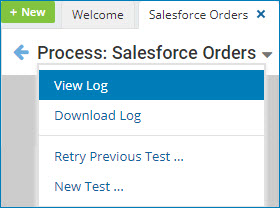
The log file opens in the Base Process Log window.
-
To download the contents of the log, click Save Logs.
Depending on your browser and its download settings, you may be prompted to specify the destination path and filename. The default filename is Test_execution-executionID-yy.mm.dd.log, where executionID is the system-assigned execution ID and yyyy, mm, and dd specify the current date — for example, Test_execution-01234567-890a-bcde-f012-3456789abcde-2018.11.10.log.
-
Click Cancel.
noteYou can download the log without first opening the Base Process Log window by clicking the drop-down arrow next to the process name and selecting Download Log.
